Understanding PLA for 3D Printing
2026-05-06
123
Catalog
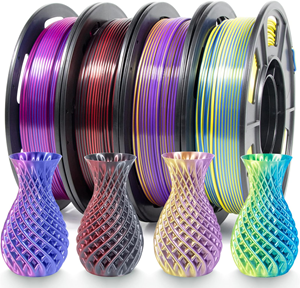
Figure 1. PLA 3D Printer Filament Spools
What Is the Melting Point of PLA
The melting point of PLA is usually around 150°C to 180°C. This is the temperature range where the material changes from a solid state into a melted form.
However, the exact melting point can vary depending on the PLA formula, filament brand, color, and added materials.
In 3D printing, the nozzle is usually set higher than PLA’s actual melting range since the filament must melt quickly as it passes through the hot end. This extra heat helps the material flow smoothly through the nozzle and bond with the previous layer. However, melting is different from softening. A finished PLA part can lose stiffness and deform before it fully melts, which is why heat exposure should be considered when choosing PLA for a printed part.
PLA Melting Point vs Glass Transition Temperature
PLA has two important temperature points: melting point and glass transition temperature. The melting point is where PLA becomes fully melted, while the glass transition temperature is where it begins to soften and lose stiffness.
|
Property |
What
It Means |
Typical
PLA Range |
Why
It Matters |
|
Glass transition
temperature |
PLA starts to soften
and lose stiffness |
55°C
to 65°C |
Finished prints may
bend, sag, or deform in warm conditions |
|
Melting point |
PLA changes from
solid into melted material |
150°C
to 180°C |
Filament can melt and
flow during printing |
|
Printing temperature |
Nozzle heat used
during printing |
180°C
to 220°C |
Helps PLA flow
smoothly and bond with each layer |
Recommended PLA Printing Temperature Settings
PLA prints best when nozzle temperature, bed temperature, and first-layer settings are properly balanced. These settings affect how the filament flows, sticks, and forms each layer.
Best PLA Temperature Settings
The best PLA temperature is not a single fixed value. It depends on your printer, filament brand, print speed, and environment. The goal is to find a setting where the filament flows smoothly, layers bond well, and the surface looks clean.
Start with the temperature range recommended on the filament spool. From there, adjust the nozzle temperature in small steps, such as ±5°C, and observe the results. A lower temperature usually improves detail and reduces stringing, while a higher temperature improves flow and layer bonding.
A practical way to find the best setting is to print a temperature tower. This test print shows how the filament behaves at different temperatures, helping you choose the range that gives the best balance between strength and surface quality.
PLA Nozzle Temperature for 3D Printing
The nozzle temperature controls how well PLA melts and flows. Most PLA filaments print well at 180°C to 220°C, depending on the brand, print speed, and setup. Low temperature can cause weak layers, rough surfaces, or poor flow. High temperature can cause stringing, blobs, or loss of detail. It is best to adjust gradually until the print looks clean and consistent.
PLA Bed Temperature for Better Adhesion
The bed temperature helps the first layer stick to the build surface. A common range is 50°C to 60°C. If the bed is too cold, the print may not stick. If it is too hot, the bottom layer may become uneven or too soft. The ideal setting may vary depending on the build surface.
PLA First Layer Settings for Better Adhesion
The first layer depends on proper bed leveling, nozzle distance, and print speed. A slower first layer helps improve adhesion. A slightly thicker first layer can also improve contact with the build plate. Keeping the surface clean and using adhesion aids can further improve results.
PLA Print Temperature Chart
|
Setting |
Common
Starting Range |
Main
Purpose |
|
Nozzle temperature |
180°C
to 220°C |
Controls filament
flow and layer bonding |
|
Bed temperature |
50°C
to 60°C |
Helps the first layer
stay attached |
|
First-layer speed |
Slow,
often 15 to 30 mm/s |
Improves first-layer
contact |
|
First-layer height |
Slightly
thicker than normal |
Helps the first layer
grip the surface |
|
Cooling fan |
Low/off
for first layer, higher after |
Supports clean
details and overhangs |
|
Temperature
adjustment |
5°C
steps |
Helps fine-tune print
quality |
How PLA Melting Point Affects 3D Print Quality
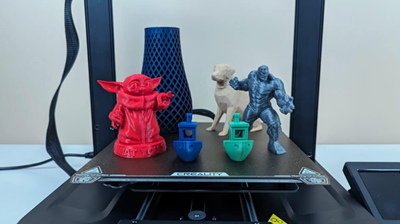
Figure 3. PLA 3D Printed Models
PLA’s melting behavior affects how clean, strong, and accurate your 3D print becomes.
If the nozzle temperature is too low, the PLA may not melt and flow properly. You may see gaps between lines, rough surfaces, weak layer bonding, under-extrusion, or clicking from the extruder. The print may also become brittle as the layers are not joining firmly enough.
If the nozzle temperature is too high, the PLA can become too fluid. This can cause stringing between travel moves, blobs on the surface, oozing from the nozzle, soft corners, and loss of fine detail. Small text, sharp edges, and decorative features may look messy as the material spreads more than it should.
The right temperature improves flow, bonding, and surface quality, while incorrect temperature leads to visible defects.
Common PLA Printing Problems
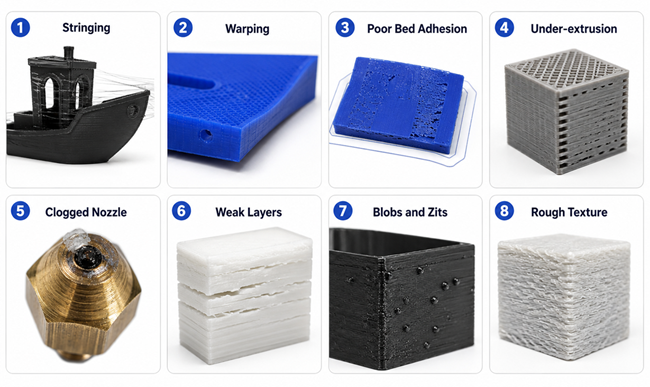
Figure 4. Common PLA Printing Problems
- Stringing creates thin plastic hairs between parts of the print. It is usually caused by too much heat, weak retraction, or moist filament. Lower the nozzle temperature slightly, tune the retraction settings, or dry the filament.
- Warping happens when the print edges pull away from the bed. This is usually caused by weak first-layer adhesion, unstable bed temperature, or uneven cooling. Clean and level the bed, use a brim, and keep the printer away from strong airflow.
- Poor bed adhesion means the first layer does not stick well. It can happen when the nozzle is too far from the bed, the surface is dirty, or the bed temperature is not stable. Re-level the bed, clean the build plate, and slow down the first layer.
- Under-extrusion causes gaps, thin lines, or weak walls. It may come from a clogged nozzle, slipping extruder gear, low flow rate, or tangled filament. Increase the nozzle temperature slightly, check the filament path, and clean the nozzle if needed.
- Clogged nozzles block smooth filament flow. They are caused by dust, old filament residue, heat creep, or overheated PLA. Clean or replace the nozzle and avoid leaving PLA hot while the printer is idle.
- Weak layers make the print easy to split or break. This can happen when layers do not bond well as of fast printing, too much cooling, or poor filament quality. Increase temperature slightly, slow the print, or reduce cooling.
- Blobs and zits are small bumps on the print surface. They are usually caused by oozing, poor retraction, too much flow, or bad seam placement. Lower the temperature slightly and adjust retraction, flow, or seam settings.
- Rough texture makes the print look uneven. It can come from moist filament, unstable flow, partial clogs, or incorrect print speed. Dry the filament, clean the nozzle, and adjust settings one at a time.
PLA vs ABS, PETG, Nylon, and ASA
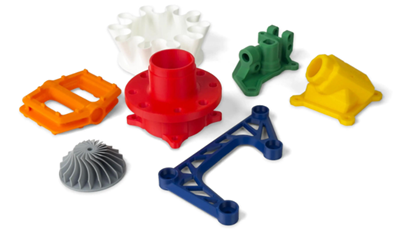
Figure 5. Functional 3D Printed Parts
PLA
PLA is the easiest material to print and is a good choice for models, decorations, prototypes, and simple indoor parts. It prints at lower temperatures, has little odor, and usually does not need an enclosure. Its main weakness is low heat resistance, so it is better for low-stress prints rather than parts exposed to heat or heavy force.
PETG
PETG is a good choice when you need more strength and flexibility than PLA. PETG is more durable and resistant to moisture, which makes it useful for containers, brackets, and everyday functional parts. It is slightly harder to print since it can cause stringing and needs better tuning, but it does not require an enclosure in most cases.
ABS
ABS is stronger and more heat-resistant than PLA. ABS is often used for functional parts, enclosures, and mechanical components that need to handle higher temperatures. However, ABS is harder to print as it can warp easily, produces a stronger smell, and usually requires an enclosure to maintain stable temperature during printing.
ASA
ASA is similar to ABS but is better for outdoor use. ASA has strong UV and weather resistance, so it is suitable for parts exposed to sunlight, rain, and changing temperatures. Like ABS, ASA can be harder to print and usually needs an enclosure and proper ventilation.
Nylon
Nylon is one of the strongest and most flexible materials among these options. Nylon is ideal for gears, hinges, clips, and mechanical parts that need to handle movement and stress. However, Nylon absorbs moisture easily, which can affect print quality, and it is more difficult to print compared to PLA.
Can PLA Melt in a Car or Hot Environment
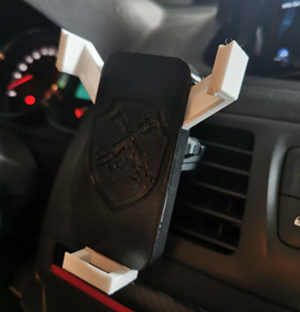
Figure 6. PLA Deformation in Hot Car Environment
Yes, PLA can get soft in a hot car or other high-temperature environments. It may not melt into liquid, but it can bend, warp, or lose its shape when exposed to heat. A parked car can become very hot under direct sunlight, which is why PLA phone holders, dashboard parts, or small clips may deform in this environment.
Thin PLA parts tend to bend faster than thicker ones. Parts that carry weight are also more likely to deform because heat reduces their stiffness. For car parts, outdoor parts, or objects used near heat sources, PETG, ABS, ASA, or Nylon is usually a better choice.
PLA Filament: Plastic or Biodegradable Material
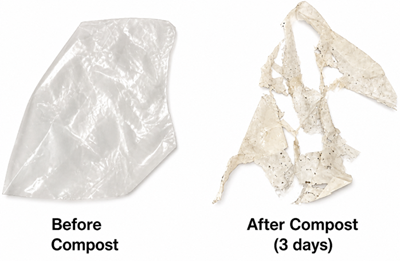
Figure 7. PLA as a Plant-Based Biodegradable Plastic
PLA filament is both a plastic and a biodegradable material, but it depends on how you look at it. PLA is a type of thermoplastic, which means it is a plastic that melts when heated and hardens when cooled. This is why it works well for 3D printing. At the same time, PLA is called biodegradable since it is made from natural sources. Under the right conditions, PLA can break down over time. However, PLA does not break down easily in normal environments. It usually needs industrial composting conditions, such as high heat and controlled moisture, to decompose properly. If you throw PLA in regular trash or leave it outdoors, it may take a long time to break down.
PLA Printing Safety and Toxicity
PLA is generally considered one of the safer materials for 3D printing, especially when compared to filaments like ABS.
During printing, PLA can still release very small particles and fumes, but the levels are typically low. In most cases, printing in a well-ventilated area is enough to reduce exposure.
PLA is made from plant-based materials, but that does not mean it is completely harmless in all situations. Additives such as color pigments or special blends may affect how it behaves when heated.
For normal use, PLA is safe for hobby printing, school projects, and home use. However, it is still good practice to: Print in a space with airflow or ventilation, Avoid placing your face close to the nozzle during printing, Wash hands after handling printed parts if needed.
PLA Filament Price: How Much Does It Cost
 SU DI NOI
Soddisfazione del cliente ogni volta.Fiducia reciproca e interessi comuni.
SU DI NOI
Soddisfazione del cliente ogni volta.Fiducia reciproca e interessi comuni.
test di funzionalita.I prodotti più convenienti e il miglior servizio sono il nostro impegno eterno.
Articolo caldo
- LM358 Doppia Amplificatore operativo Guida completa: pinout, diagrammi dei circuiti, equivalenti, esempi utili
- CR2032 e CR2016 sono intercambiabili?
- Comprensione delle differenze ESP32 ed ESP32-S3 Analisi tecnica e delle prestazioni
- Scegliere la batteria giusta: una guida agli equivalenti AG4, LR626, LR66, 177/376/377, SR626 e SR626SWSW
- Nozioni di base sui transistor BC547: piedinatura, circuiti applicativi, modelli alternativi/complementari
- NPN vs. PNP: Qual è la differenza?
- ESP32 vs STM32: quale microcontrollore è migliore per te?
- Cos'è un MOSFET e come funziona?
- Relè elettrico base: funzionamento di lavoro, tipi e usi
- Transistor PNP: struttura, principio di lavoro e applicazione
 Cos'è il multiplexer e il demultiplexer?Tipi, funzionamento ed esempi pratici
Domande frequenti [FAQ]
1. How can I find the best nozzle temperature for my PLA filament?
Start with the temperature range recommended by the filament brand, then adjust in small steps. Look for smooth extrusion, clean surfaces, and strong layer bonding. A temperature tower test can also help identify the best setting.
2. What is the most common cause of poor PLA print quality?
Incorrect temperature balance. If the nozzle temperature is too low or too high, it can affect flow, layer bonding, and surface finish, leading to issues like gaps, stringing, or rough texture.
3. Why does my PLA print look rough even when the settings seem correct?
Rough surfaces can be caused by moist filament, partial nozzle clogs, unstable extrusion, or inconsistent print speed. Even small issues in filament condition or hardware can affect the final surface quality.
4. When should I choose a material other than PLA?
You should choose another material if your part needs to handle heat, outdoor exposure, heavy loads, or mechanical stress. PLA is best for indoor, low-stress applications.
5. Can PLA prints be improved without changing the printer hardware?
Yes. Adjusting temperature, print speed, cooling, bed leveling, and filament condition can improve print quality without changing hardware.
Numero di parte caldo
 GRM188C80G106ME47D
 CGB4B1X7R1A225K055AC
 LLA215C70G105MA14L
 06035A7R0CAT2A
- 0603ZC183KAT2A
 LD061A1R0CAB2A
 1206AA471JAJ1A
- GRM1886S1H7R6DZ01D
- GRM1887U2A7R8DZ01D
 TPSS475K006R4000
- SY58029UMG-TR
- V24C5H100BL3
- PIC18F4510-I/PT
- MC68HC16Z1MAG16
- MB95F264HPFT-G-SNE2
- AT28BV256-20JI
- AT45DB161E-SSHD-T
- RT0805BRE07360KL
- TAJB336K010TNJ
- SN65LVDS180DRG4
- VNQ600APTR-E
- XC5210-6PQ160C
- PCA9538PW
- T491B226K010AT24787622
- DS90CF366MTDX/NOPB
- CDCLVD110ARHBR
- XCV300-4BG352I
- LC75853NW-E
- BQ24081DRCR
- TRSF3221CDBR
- LT3755EUD-1#PBF
- ADP1612ARMZ-R7
- BD8192EFV-HVE2
- CS8322Z36E-250
- DP83848CVVX/DP83848IVVX
- EPM7128ELC84-15W
- LTC4355EMS#PBF
- M32902WG
- MAX5250ACAP-T
- MC10EP11DT
- SI9181DQ-30-T1
- DT121N25/18KOF
- K9K1208U0C-JIB0
- RM7935-835L-C004
- MSD388I-000-Z1-TM
- MT6517A-CTAH
- CS241C079PNTRQ1
- H9DA4VH4JJMMCR-4EM
- MCF5102PV33B