Understanding Alphanumeric Codes in Computers and Networks
2026-05-09
38
Catalog
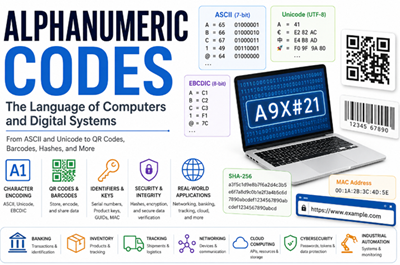
Figure 1. Alphanumeric Codes in Modern Computing
What Is an Alphanumeric Code?
An alphanumeric code is a code made from letters, numbers, and sometimes special symbols to represent information in digital systems, identification systems, communication technologies, and computer processing. The term “alphanumeric” comes from “alphabetic” characters, such as A–Z, and “numeric” characters, such as 0–9. In many systems, symbols such as @, #, -, or % may also be included depending on the format or application.
Unlike a numeric code that uses only numbers, an alphanumeric code can represent more detailed information since it combines different character types. For example, “12345” is purely numeric, while “AB123” is alphanumeric since it contains both letters and numbers. A password like “A9X#21” may also be treated as alphanumeric with symbols since it combines letters, numbers, and a special character.
Alphanumeric codes are common in daily life. You can see them in passwords, product serial numbers, QR codes, tracking numbers, usernames, file names, Wi-Fi passwords, and vehicle license plates. They help computers and devices store, read, send, and identify information.
In computers, letters, numbers, and symbols are changed into special digital codes using systems like ASCII and Unicode. This helps computers understand and display text correctly across different devices and software.
Why Computers Use Alphanumeric Codes
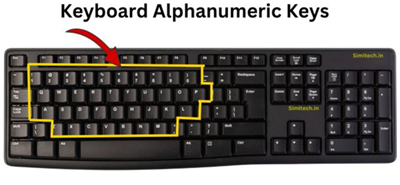
Figure 2. Alphanumeric Keys on a Keyboard
Modern computers use alphanumeric codes since they need to handle text, numbers, symbols, and commands in a machine-readable way. These codes allow computers to understand information entered through keyboards, saved in files, displayed on screens, and sent across networks.
Alphanumeric codes are required for digital communication and data storage. For example, email addresses, filenames, usernames, passwords, and website links all use letters, numbers, and sometimes symbols. Operating systems also use alphanumeric text for file paths, settings, commands, and program instructions.
Without alphanumeric codes, computers would only process numbers and could not easily display words, names, messages, or symbols. Systems like ASCII and Unicode help convert human-readable characters into digital data that computers can store, process, and share accurately.
To understand how computers handle alphanumeric data, it is important to learn how different digital systems store, encode, identify, and transmit information. Technologies such as ASCII, Unicode, and EBCDIC convert characters into digital data, while systems like QR codes, barcodes, GUIDs, MAC addresses, URLs, product keys, serial numbers, and file hashes use alphanumeric formats for identification, communication, tracking, and security purposes.
ASCII vs Unicode vs EBCDIC
ASCII
ASCII stands for American Standard Code for Information Interchange. It was introduced in the 1960s and became one of the first universal standards for text encoding in computers and electronic communication systems. ASCII uses a 7-bit binary system, allowing it to represent 128 characters. These include uppercase and lowercase English letters, numbers from 0 to 9, punctuation marks, mathematical symbols, and control characters.
For example:
• A = 65
• B = 66
• 1 = 49
• @ = 64
ASCII also includes non-printable control characters used in communication and device control. These characters help computers manage text formatting, data transmission, and device instructions.
|
Decimal |
Binary |
HEX |
Symbol |
Description |
|
0 |
0000000 |
00 |
NUL |
Null character |
|
1 |
0000001 |
01 |
SOH |
Start of Heading |
|
2 |
0000010 |
02 |
STX |
Start of Text |
|
3 |
0000011 |
03 |
ETX |
End of Text |
|
4 |
0000100 |
04 |
EOT |
End of Transmission |
|
5 |
0000101 |
05 |
ENQ |
Enquiry |
|
6 |
0000110 |
06 |
ACK |
Acknowledgment |
|
7 |
0000111 |
07 |
BEL |
Bell |
|
8 |
0001000 |
08 |
BS |
Backspace |
Unicode
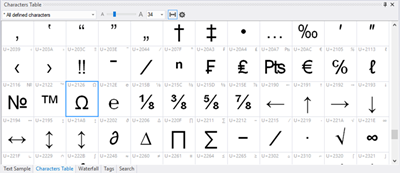
Figure 3. Unicode Character Map
Unicode is a modern character encoding standard created to solve the language limitations of ASCII and other older encoding systems. Its goal is to provide a single universal system that can represent text from almost every writing system in the world. Unicode supports English characters, Chinese characters, Japanese text, Arabic and Hebrew scripts, mathematical and technical symbols.
|
Code |
0 |
1 |
2 |
3 |
4 |
5 |
0A |
0B |
0C |
0D |
0E |
|
0020 |
- |
! |
“ |
# |
$ |
% |
* |
+ |
, |
— |
. |
|
0040 |
@ |
A |
B |
C |
D |
E |
J |
K |
L |
M |
N |
|
0060 |
` |
a |
b |
c |
d |
e |
j |
k |
l |
m |
n |
|
0080 |
€ |
— |
‚ |
ƒ |
“ |
… |
Š |
‹ |
Π|
Ž |
— |
|
00A0 |
¡ |
¢ |
£ |
¤ |
¥ |
ª |
« |
¬ |
— |
® |
|
|
00C0 |
À |
Á |
 |
à |
Ä |
Å |
Ê |
Ë |
Ì |
Í |
Î |
|
00E0 |
à |
á |
â |
ã |
ä |
å |
ê |
ë |
ì |
í |
î |
Unlike ASCII, Unicode can represent millions of possible characters using different encoding formats such as:
• UTF-8
• UTF-16
• UTF-32
UTF-8 is the most widely used format since it is efficient and compatible with ASCII. In UTF-8, standard English characters usually use 1 byte, while international characters may use 2 to 4 bytes depending on the language or symbol. This is why Unicode is essential for websites, mobile phones, operating systems, databases, cloud platforms, messaging apps, and social media systems. It allows a single document or webpage to contain multilingual text, emojis, currency symbols such as €, and scientific symbols at the same time.
EBCDIC
EBCDIC stands for Extended Binary Coded Decimal Interchange Code. It is a character encoding system developed by IBM mainly for large mainframe and enterprise computer systems. Like ASCII and Unicode, EBCDIC is used to represent letters, numbers, symbols, and control commands in a digital format that computers can process.
EBCDIC uses an 8-bit structure and can represent up to 256 characters. It was widely used in older IBM hardware, banking systems, government databases, and enterprise servers. Unlike ASCII, EBCDIC follows a different internal character arrangement, which makes it less compatible with many modern computer systems and software platforms.
Some common EBCDIC character values are shown below:
|
Character |
HEX |
Binary |
|
A |
C1 |
11000001 |
|
B |
C2 |
11000010 |
|
C |
C3 |
11000011 |
|
D |
C4 |
11000100 |
|
E |
C5 |
11000101 |
|
F |
C6 |
11000110 |
|
P |
D7 |
11010111 |
|
Q |
D8 |
11011000 |
|
R |
D9 |
11011001 |
|
4 |
F4 |
11110100 |
|
5 |
F5 |
11110101 |
|
6 |
F6 |
11110110 |
How QR Codes Store Alphanumeric Data
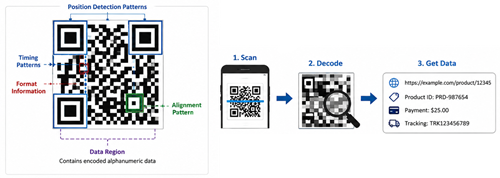
Figure 4. QR Code Structure and Data Decoding
QR codes store alphanumeric information inside a square pattern made of black and white blocks. When a phone or scanner reads the code, it detects the pattern and translates it into the original data, such as a website link, product ID, payment detail, or tracking number.
QR codes can use different encoding modes. Alphanumeric mode is used for uppercase letters, numbers, and selected symbols. This mode is ideal since it stores common text data more efficiently than some other formats. QR codes are more advanced than regular barcodes as they store data in both horizontal and vertical directions. This two-dimensional structure allows them to hold more information in a smaller space.
They also include error correction, which helps the code remain readable even if part of it is dirty, scratched, or slightly damaged. This is why QR codes are used in payments, warehouses, factories, product labels, tickets, and mobile apps.
Barcode Encoding Systems
Barcode encoding systems use black bars and white spaces to identify products, parts, and records. When a scanner reads the barcode, it matches the pattern to stored data in a computer system.
Different barcode formats support different types of information. UPC is common in retail stores and is mainly used for product numbers, pricing, and inventory. Code 39 can include letters and numbers, so it is usually used for warehouse labels, tools, machine parts, and equipment IDs. Code 128 supports a wider character set and stores data more compactly, making it useful for shipping labels, logistics, healthcare, and supply chain systems.
Barcodes help businesses scan items quickly instead of typing codes manually. This improves accuracy in retail checkout, factory tracking, warehouse management, delivery systems, and industrial identification.
QR Codes vs Barcodes: Key Differences
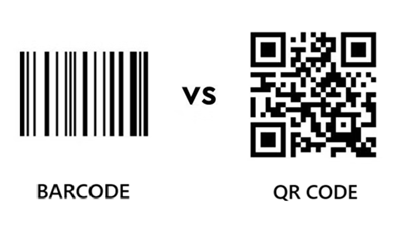
Figure 5. QR Codes vs Barcodes
|
Feature |
Barcode |
QR
Code |
|
Structure |
1D code with vertical
black bars and white spaces |
2D square code with
black and white modules |
|
Data Direction |
Stores data mainly in
one direction |
Stores data
horizontally and vertically |
|
Data Capacity |
Usually stores about
20 to 25 characters, depending on type |
Can store up to 4,296
alphanumeric characters |
|
Character Support |
UPC supports numbers
only; Code 39 and Code 128 support alphanumeric data |
Supports numeric,
alphanumeric, byte/binary, and Kanji modes |
|
Error Correction |
Very limited error
recovery |
Can recover about 7%
to 30% of damaged data, depending on level |
|
Scanning Angle |
Usually needs a clear
horizontal scan |
Can be scanned from
different angles |
|
Space Efficiency |
Needs more horizontal
space for longer data |
Stores more data in a
smaller square area |
|
Common Uses |
Retail checkout,
product labels, inventory, warehouse tracking |
Payments, website
links, tickets, product tracking, mobile apps |
|
Best For |
Simple product
identification |
Larger data storage
and fast digital access |
Product Keys, Serial Numbers, and File Hashes
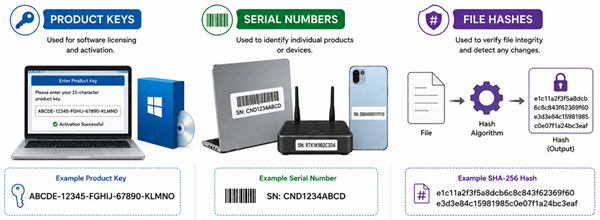
Figure 6. Product Keys, Serial Numbers, and Hashes
Product keys, serial numbers, and file hashes use alphanumeric codes to identify, verify, and protect software, files, and electronic devices. These codes are useful as they can combine letters and numbers in a compact format that software systems can read, store, and compare.
Product key is used for software licensing and activation. When you install paid software, the product key helps confirm that the software copy is valid. Some activation systems check the key locally, while others verify it through an online server. Product keys may also contain details about the software version, edition, license type, or activation period.
Serial numbers are used to identify individual products or devices. Manufacturers use them for warranty records, product tracking, support, repair history, and device authentication. For example, a laptop, router, smartphone, or electronic module may have a unique serial number that helps confirm its identity.
File hash is a fixed-length string created from the contents of a file using a hash algorithm. Common examples include MD5, SHA-1, and SHA-256. If even one small part of the file changes, the hash value will usually become completely different. This makes file hashes useful for checking data integrity, verifying downloads, detecting tampering, and confirming that software has not been modified.
MD5 and SHA-1 were widely used in the past, but they are now considered weak for security because of collision risks. SHA-256, which belongs to the SHA-2 family, is more widely trusted for modern file verification. A typical SHA-256 hash may look like this: e1c11a2f3f5a8dcb6c8c843f62369f60e3d3e84c15981985c0e07f1a24bc3eaf.
MAC Addresses, GUIDs, and URLs
MAC Addresses
A MAC address, or Media Access Control address, is a unique hardware identifier assigned to a network interface, such as a computer network adapter, router, printer, or wireless card. It helps devices identify each other inside a local network.
MAC addresses are usually written in hexadecimal notation, using numbers from 0 to 9 and letters from A to F. An example is 00:1A:2B:3C:4D:5E. As result of this format, MAC addresses are another example of how alphanumeric codes are used in networking.
GUIDs
A GUID, or Globally Unique Identifier, is a long alphanumeric code used to identify digital resources in computing systems. GUID is commonly used for database records, software objects, files, cloud systems, and distributed applications.
A GUID is usually written as 32 hexadecimal characters grouped into five sections, separated by hyphens. A common format looks like this: 550e8400-e29b-41d4-a716-446655440000. Each hexadecimal digit represents 4 bits, so a full GUID represents 128 bits of data.
GUIDs are generated by algorithms to make the chance of duplication extremely low. Depending on the GUID version, the value may be based on time, random numbers, device-related information, or a combination of these elements. GUIDs are mainly designed for machine processing, but the hyphen-separated format also makes them easier for people to read and copy.
URLs
A URL, or Uniform Resource Locator, is the address used to find a webpage, file, or online service. URLs can contain letters, numbers, symbols, and special encoded values. Some characters cannot be used directly in a URL, so they are converted into a safe format through URL encoding. For example, a space is often written as %20. This helps browsers and servers read web addresses correctly when they contain special characters, spaces, or symbols.
Practical Applications of Alphanumeric Codes
• Banking systems: Transaction IDs, account references, SWIFT codes, OTPs, and payment confirmation numbers.
• Tracking systems: Parcel tracking numbers, shipment IDs, and logistics codes for monitoring deliveries.
• Inventory management: Product SKUs, barcodes, warehouse labels, and stock codes for organizing goods.
• Networking: MAC addresses, device IDs, network names, and other identifiers for connected devices.
• Cybersecurity: Passwords, file hashes, encryption keys, tokens, and authentication codes.
• Software licensing: Product keys, activation codes, and license IDs for verifying software access.
• QR payments: Payment links, merchant IDs, transaction details, and account information inside scannable codes.
• Web addresses: URLs, domain names, file paths, and encoded characters for locating online resources.
• Cloud computing: Resource IDs, API keys, access tokens, and storage object names.
• Databases: User IDs, record IDs, GUIDs, and reference keys for organizing digital records.
• Industrial automation: Equipment IDs, sensor labels, machine codes, and production tracking numbers.
 SU DI NOI
Soddisfazione del cliente ogni volta.Fiducia reciproca e interessi comuni.
SU DI NOI
Soddisfazione del cliente ogni volta.Fiducia reciproca e interessi comuni.
test di funzionalita.I prodotti più convenienti e il miglior servizio sono il nostro impegno eterno.
Articolo caldo
- LM358 Doppia Amplificatore operativo Guida completa: pinout, diagrammi dei circuiti, equivalenti, esempi utili
- CR2032 e CR2016 sono intercambiabili?
- Comprensione delle differenze ESP32 ed ESP32-S3 Analisi tecnica e delle prestazioni
- Scegliere la batteria giusta: una guida agli equivalenti AG4, LR626, LR66, 177/376/377, SR626 e SR626SWSW
- Nozioni di base sui transistor BC547: piedinatura, circuiti applicativi, modelli alternativi/complementari
- NPN vs. PNP: Qual è la differenza?
- ESP32 vs STM32: quale microcontrollore è migliore per te?
- Cos'è un MOSFET e come funziona?
- Relè elettrico base: funzionamento di lavoro, tipi e usi
- Transistor PNP: struttura, principio di lavoro e applicazione
 Guida alla velocità di risposta dell'amplificatore operazionale: formula, misurazione, effetti e selezione
2026-05-09
 Una guida completa al cablaggio, all'installazione e ai circuiti di protezione degli interruttori termici
2026-05-08
Domande frequenti [FAQ]
1. Why are alphanumeric codes more useful than numeric codes in modern computing?
Alphanumeric codes can store both letters and numbers, allowing computers to represent usernames, passwords, file names, URLs, serial numbers, and other complex information more efficiently than numeric-only systems.
2. Why do computers convert letters and symbols into binary values?
Computers process electrical signals internally and only understand binary data made of 0s and 1s. Character encoding systems such as ASCII and Unicode convert human-readable characters into machine-readable binary values.
3. Why do QR codes store more information than traditional barcodes?
QR codes use a two-dimensional structure that stores data both horizontally and vertically. This allows them to hold much more alphanumeric information in a smaller space compared to one-dimensional barcodes.
4. How does error correction improve QR code reliability?
QR codes include error correction algorithms that allow scanners to recover damaged or missing data. This helps QR codes remain readable even if part of the code is scratched, dirty, or partially covered.
5. Why are MD5 and SHA-1 considered weak for security today?
MD5 and SHA-1 have known collision vulnerabilities, meaning different files can sometimes generate the same hash value. As result of this, stronger algorithms such as SHA-256 are preferred for modern verification and cybersecurity systems.
6. Why are alphanumeric codes important in networking and cloud computing?
Modern networks and cloud systems rely on alphanumeric identifiers such as MAC addresses, URLs, GUIDs, API keys, and access tokens to identify devices, manage communication, secure resources, and organize digital data.
Numero di parte caldo
 CGA2B2X5R1E333M050BA
 CC0603FRNPO9BN120
 GCM1885C1H4R9CA16D
 06035U330FAT2A
 12067C822KAT4A
 1812SC102KATRE
 T495X687K006ZTE100
 170M5462
 CS8416-CSZ
 AT28BV64B-20JU
- EP4CE10F17I7N
- EL7535IYZ
- ACS712ELCTR-30A-T
- VI-J6N-CX
- VE-2T3-EV
- V300C12H150AL
- ADS8324E/250
- T491C106M025AT4153
- TPS75105YFFT
- MB95128MBPMC-GS-120E2
- LMK00338RTAR
- FDMC86184
- ADS7883SBDBVR
- TPS2013APWP
- M74HC4094RM13TR
- STH180N10F3-2
- ISOW7841FDWE
- HYB18TC512160CF-1.9
- LC75384NE-R
- LM285BX-M1.2
- M29F040B-90K6
- MN101E31GLL
- PEB20532FV1.3
- TMPZ82C256BF-2
- CB3Q16210Q
- EP9531G-5
- LE796101DLC
- R703F080GA-2-502
- MAX173EWG
- MAX9381EUA
- N80C196KB-16
- SKR133/12KK
- RTD2644D
- TDA8854H
- LE9535DETCT
- RTS5106-01E-LF
- TPS7A4701RGW
- LM3881MME
- 9140009915